The Tactical Integration of Animal Skins Seamless Patterns
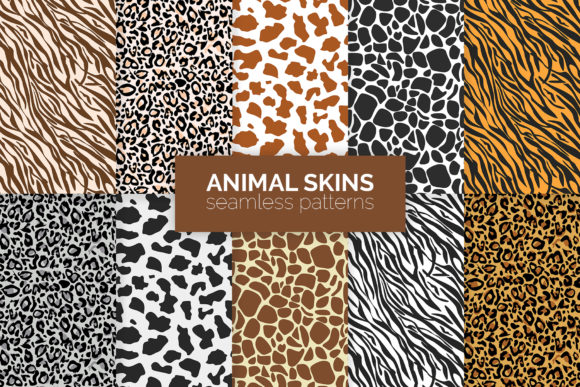
In the domain of visual design, a animal skins seamless pattern is more than just an aesthetic asset; it's a functional component engineered for repetition. These digital textures, replicating the intricate scales, fur, or hides of various creatures, are created to tile perfectly across any surface without visible seams or breaks. This technical quality makes them a powerful, often understated, tool within a professional's workflow. Their value isn't found in isolated admiration, but in how they are strategically applied within a broader creative or commercial process.
Situating Patterns within the Design Process
Understanding where animal skins seamless patterns fit begins with mapping the typical design workflow. This process often starts with conceptual planning, moves through asset acquisition and application, and concludes with final output and iteration. The seamless pattern acts as a mid-phase resource. It is procured or created after the core theme and direction are set, but before the final composition is locked. For instance, a brand designer developing a campaign for a wildlife conservation NGO would, after establishing the mood and message, seek out a high-quality crocodile skin or leopard fur pattern to apply to backgrounds, textural overlays, or product mockups.
The pattern's seamless property is its critical operational feature. This eliminates a significant technical hurdle—manually editing and aligning a texture to avoid ugly, obvious repeats. By solving this problem at the asset level, the pattern directly contributes to efficiency and consistency. It allows the designer to focus on application and scale rather than repair, ensuring that whether the pattern covers a small logo backdrop or an entire website header, the visual integrity remains uniform.
Interaction with Tools and Platforms
These patterns do not exist in isolation. Their utility is realized through integration with standard design software like Adobe Photoshop, Illustrator, or Affinity Designer, as well as through web-based platforms like Canva. The workflow is straightforward: import the pattern file, define an area (a shape, a layer, a digital "wall"), and apply the pattern as a fill. In more advanced uses, the pattern might be employed as a displacement map in 3D rendering software to give a realistic skin texture to a modeled animal, showcasing its crossover utility between graphic design and digital illustration.
Compatibility is key. Professionals must consider file format (JPEG for web use, high-resolution PNG for print, vector SVG for infinite scalability), color mode (RGB for digital, CMYK for physical products), and licensing. A pattern sourced from a stock asset library must be compatible with the project's commercial scope. This pre-application check is a vital step in the process, ensuring smooth implementation and avoiding last-minute legal or technical roadblocks.
Practical Implementation and Use Cases
The application of animal skins seamless patterns spans numerous fields, each with its own workflow nuances. For a small business owner producing physical goods, such as a maker of luxury phone cases or journals, the pattern might be used during the product visualization stage. After finalizing the product dimensions and materials in a CAD tool, a zebra hide pattern is applied to the digital model to create a marketing render. This visual then feeds directly into e-commerce site uploads, social media campaigns, and packaging design.
In digital content creation, a blogger or educator might use a subtle snake scale pattern as a background for a presentation template or a series of YouTube video overlays. Here, the pattern is integrated after the core content is written but before the final visual asset is produced. The creator selects a pattern that aligns with the topic's tone—perhaps a reptilian texture for a science channel—and applies it systematically across a suite of materials to establish brand consistency. This repetition builds a recognizable visual identity without requiring custom art for every single piece of content.
Preparation and Quality Control
Effective integration requires preparation. This involves building a personal or organizational library of curated patterns. A freelance graphic designer might maintain a sorted folder of patterns—categorized by animal type, color palette, and visual intensity (bold vs. subtle). This organizational step, done before active projects begin, drastically speeds up the workflow later. When a client requests a "savage, organic feel," the designer can quickly browse and test suitable tiger or alligator patterns rather than starting a frantic new search.
Quality control is another process-oriented consideration. Before finalizing any design, one must assess the pattern's application at different scales. Does it become muddy when shrunk for a mobile view? Does the repeat become too predictable and artificial when stretched over a large area? Testing these parameters is a simple but crucial step in the workflow, often done by creating multiple mockups. It ensures the final output maintains professional polish and the pattern serves its purpose without distraction.
Long-Term Strategic Value
Beyond single projects, animal skins seamless patterns can play a role in long-term resource management. For a marketing agency, a collection of premium, licensed patterns becomes a reusable brand asset. Once acquired and properly formatted, a high-quality elephant skin pattern can be deployed across multiple client projects over years, provided the themes align. This represents a smart investment, turning a one-time asset purchase into a persistent tool that enhances efficiency for future workflow cycles.
Furthermore, these patterns encourage a mindset of systematic design. Their very nature—seamless, repeatable, consistent—mirrors the principles of good process management: eliminating friction, ensuring uniformity, and enabling scalable production. A designer who masters the use of such patterns often develops a more methodical approach to other aspects of their work, understanding how standardized assets can streamline complex visual tasks.
Adapting the Pattern to Your Routine
Integrating this tool into your personal or professional routine doesn't require a revolution. Start by analyzing one recurring task in your workflow. Do you regularly produce social media graphics? Design internal presentations? Create prototypes for products? Identify one instance where a textured background could add value without complexity. Then, source a single, versatile animal skins seamless pattern—a neutral reptile scale or a classic leopard spot—and apply it to that specific task type for a month.
Observe the impact. Did it save time? Did it improve visual cohesion across multiple outputs? This practical, limited-scope experiment provides real data on its utility. Based on the results, you can then decide to expand its use, perhaps building a small library of patterns for different project moods (aggressive, natural, luxurious) and formally incorporating their selection into your project kick-off checklist. The goal is not to use patterns everywhere, but to use them effectively where they truly enhance the process and the final product.
The journey from seeing an animal skins seamless pattern as a mere picture to recognizing it as a procedural asset is the key. It shifts the focus from "what it looks like" to "how it works" within your system. When implemented with consideration for compatibility, scale, and consistency, it becomes a silent, powerful engine in your creative or commercial workflow, doing its job seamlessly—just as its design intends.